sing-box rule-set from any website: domains and networks for Hiddify and sing-box
Updated · NetRoute version 4.1.4
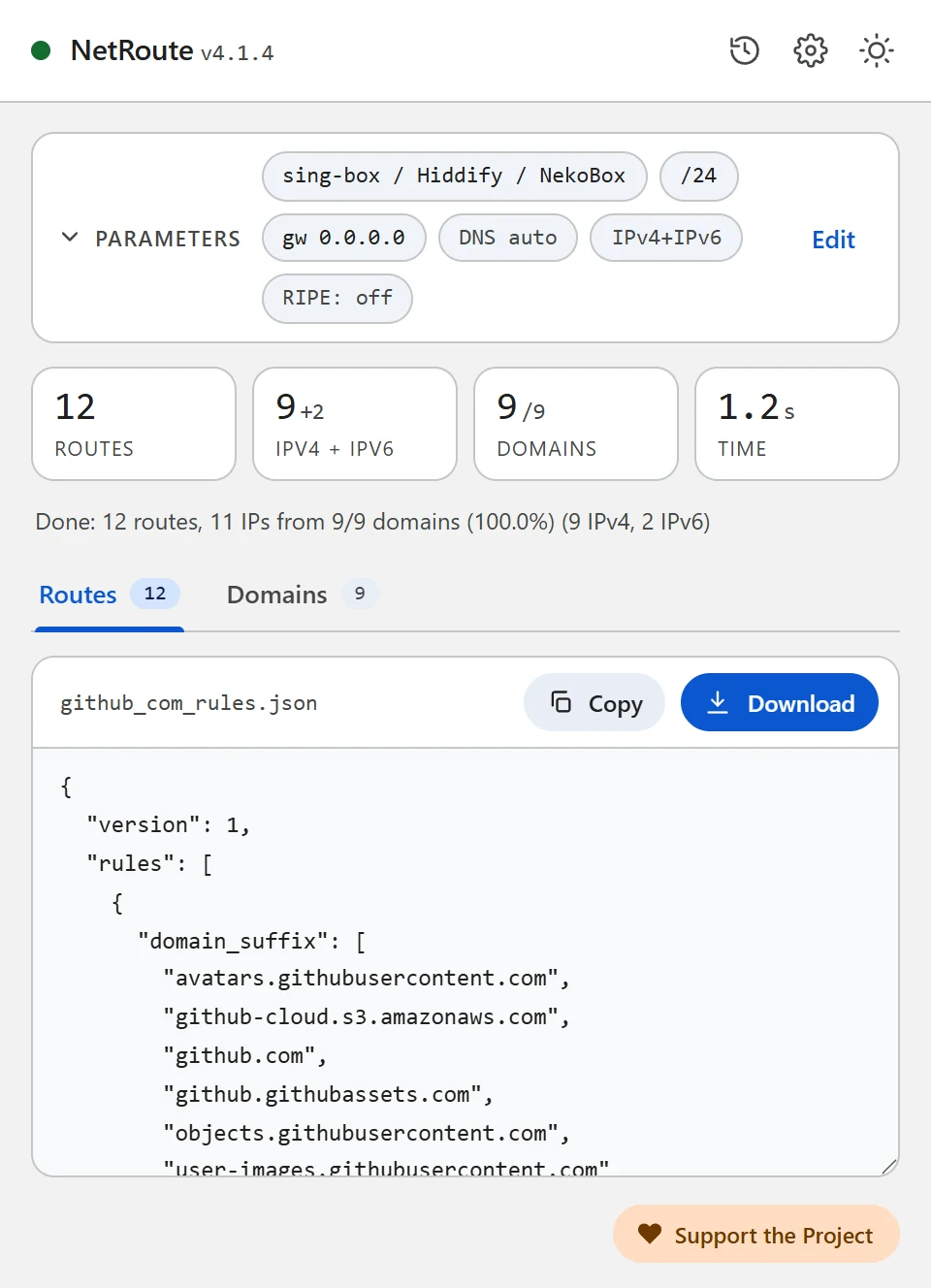
sing-box and the clients built on it — the official sing-box apps, Hiddify, NekoBox — decide what goes through the proxy by rules: lists of domains and networks, packaged since version 1.8.0 as rule-sets. NetRoute builds such a rule-set straight from a website: open the site, click “Analyze website”, download the .json.
What is inside the file
A rule-set in the source format (source) is a JSON document with version and rules. NetRoute writes the domains and the networks as two separate rules: per the sing-box documentation the conditions inside one rule are combined with a logical AND, so a single rule with both domains and networks would match only when both agree.
{
  "version": 1,
  "rules": [
    { "domain_suffix": ["github.com", "githubusercontent.com"] },
    { "ip_cidr": ["140.82.112.0/20", "185.199.108.0/22", "2606:50c0::/32"] }
  ]
}domain_suffix— a domain suffix match: the domain itself and all its subdomains. NetRoute folds the list: when the page usesapi.github.comandgithub.com, onlygithub.comstays; awww.prefix is dropped. Every domain of the scan is listed, including those that did not resolve to an IP.ip_cidr— a network match. These are the same aggregated networks NetRoute would emit as routes for a router, IPv4 and IPv6 together; the rule is present when at least one domain resolved to an address.version: 1— the first version of the format, introduced in sing-box 1.8.0.
What you need
- sing-box 1.8.0 or newer: the
sing-boxbinary on a computer, server or router, or the official apps sing-box for Android, sing-box for Apple platforms, sing-box for Desktop - or Hiddify — a client built on the sing-box core which, per its README, accepts configurations in the sing-box format (Android, iOS, Windows, macOS, Linux)
- A working proxy outbound in the config — any protocol
- The NetRoute extension in Chrome
Step 1. Generate the rule-set in NetRoute
- Open the website in Chrome and reload the page so the extension’s sniffer sees the background requests
- Start NetRoute
- Under Target OS pick sing-box / Hiddify / NekoBox — the “Proxy clients” group
- The Gateway IP and Device fields do not affect this format
- Click Analyze website
- On the Domains tab untick what you do not need — counters, ad networks, third-party CDNs; the rules update at once
- Click Download: the file is named after the site, for example
github_com_rules.json
ip_cidr rule is always in the file when there are resolved addresses, and it does not get in the way of the domain rule. Want domains only — delete the second rule from the file. Want fewer networks — choose IPv4 Only under Route Mode: the rule keeps no IPv6 prefixes.
Step 2. Describe the file in the sing-box config
A local file next to the config. format may be omitted when the path ends in .json or .srs; since 1.10.0 sing-box reloads the file by itself when it changes.
{
  "route": {
    "rule_set": [
      {
        "type": "local",
        "tag": "netroute",
        "format": "source",
        "path": "github_com_rules.json"
      }
    ],
    "rules": [
      { "rule_set": "netroute", "action": "route", "outbound": "proxy" }
    ],
    "final": "direct"
  }
}outbound— the tag of your proxy outbound."action": "route"is required from sing-box 1.11.0 on: the oldoutboundfield directly in the rule is deprecated there.final— the default outbound for everything that matched no rule;directgives classic split tunneling.
A file by URL. Put the .json into a GitHub repository or on your own server and give the direct link to the raw file; by default sing-box refreshes it once a day (update_interval = 1d):
{
  "type": "remote",
  "tag": "netroute",
  "format": "source",
  "url": "https://raw.githubusercontent.com/you/rules/main/github_com_rules.json",
  "update_interval": "1d"
}
If the link has to be downloaded through the proxy: up to sing-box 1.13 the download_detour field with an outbound tag did that; 1.14.0 deprecated it in favour of http_client, and 1.16.0 removed it.
route block above together with your outbound to such a config and import it as a profile. How exactly a profile is imported in your version of Hiddify is described in the app’s documentation.
Step 3. Check
The syntax of the config together with the rule-set:
sing-box check -c config.jsonThen start sing-box and open the site. If it opens through the proxy while other sites go direct — the rule works. If not, go through the common problems below.
Compiled rule-set (.srs)
For big lists sing-box offers a binary format. Compile the NetRoute file with the command from the documentation:
sing-box rule-set compile github_com_rules.json
# → github_com_rules.srs
In the config set "format": "binary" and the path to the .srs. For a dozen sites this is not necessary.
Common problems
sing-box rejects the file
Rule-sets appeared in sing-box 1.8.0; older versions and clients built on them do not know the format. NetRoute writes the minimal version: 1 — every later version reads it.
The rule does not match a subdomain
domain_suffix covers the subdomains of the domains in the list only. If the site pulls data from another domain, it should be visible on the Domains tab in NetRoute. Walk through the site before scanning — sign in, open a video — so the extension’s sniffer sees the deferred requests too.
Connections by IP bypass the proxy
A domain rule needs sing-box to know the destination name. That is what sniffing is for: it takes the name from the HTTP Host field and from the Server Name in TLS and QUIC. From sing-box 1.11.0 sniffing is enabled by a rule with "action": "sniff" in route.rules (the old inbound sniff field is deprecated and was removed in 1.13.0). Connections without a name are matched by the ip_cidr rule — for services whose addresses change, enable Route Optimization → BGP Prefix in the NetRoute options: the networks become the announced prefixes instead of single addresses.
One rule-set for several sites
Click URL list next to the analyze button and paste the list of sites — NetRoute builds one rule-set for all of them, the file is named bulk_N_rules.json.
DNS and leaks
A domain rule does not change how the browser resolves names: the DNS query for github.com still goes to the resolver configured in the system or in the browser itself, and when that is the ISP’s resolver, the ISP sees the names of the sites.
- In sing-box the DNS rules can reference the same rule-set: a
dns.rulesentry with"rule_set": "netroute","action": "route"andserversends the queries for these domains to the chosen DNS server. To make the server itself go through the proxy, give it adetourwith the outbound tag — a field of the shared Dial Fields; servers in the new format ("type": "https"and others) appeared in sing-box 1.12.0. - In Chrome turn off “Use secure DNS” or point it at a resolver you trust: the browser’s own DNS-over-HTTPS works past the system resolver — see the Troubleshooting section of the project.
Check: dnsleaktest.com with the client on should show the proxy’s resolver, not the ISP’s.
Example Configuration File
Ready-to-edit template. Replace the example domains and networks with output from NetRoute for your target sites.
singbox-rules.json— a rule-set in the source format withdomain_suffixandip_cidrrules
{
  "version": 1,
  "rules": [
    {
      "domain_suffix": [
        "avatars.githubusercontent.com",
        "github.com",
        "github.githubassets.com"
      ]
    },
    {
      "ip_cidr": [
        "140.82.112.0/20",
        "185.199.108.0/22",
        "2606:50c0::/32"
      ]
    }
  ]
}
Hint: the text formats download with a comment header. Untick “Include comments in exported files” in the NetRoute options to get the rules alone; the JSON formats never carry comments.
All example configs on GitHub →
Official Documentation
- sing-box: Rule Set — local and remote fields
- sing-box: Source Format — version, the compile command
- sing-box: Headless Rule — domain_suffix, ip_cidr
- sing-box: Rule Action — route, sniff
- sing-box: DNS Rule
- Hiddify — README: supported configuration formats
Related Guides
- Keenetic — routes from a
.batupload - MikroTik —
.rscscript import into RouterOS - WireGuard — split tunneling via
AllowedIPs - Linux —
ip routeshell script - OpenVPN —
routedirectives in the client config - Xray / 3X-UI / v2rayN — routing.rules for Xray-core, 3X-UI and v2rayN
- Happ — routing profile as a happ://routing link
- AmneziaVPN — site list for split tunneling
Ready to try?
NetRoute — a free Chrome extension to generate routes from any website.
Install Extension